
Shift Start
One text before the shift starts: who's in, who's out, and the gaps to cover. Plus a shift handoff that carries the outgoing supervisor's notes forward. No app, no integration.
Your points tracking shouldn't live in a spreadsheet someone has to update by hand and hope the math holds. The Points System reads the policy you already wrote, scores every event automatically, catches protected-leave risk before a point lands, holds it for HR approval, and keeps a dated record behind every decision.

Each quarter we do performance reviews, and part of it is a bonus. We grade you on your performance, your attendance, and your teamwork, so these are important to get right. We want to make sure they're fair. TeamSense has really been great for that, for creating a fair playing field for the attendance component.
A good employee point system coaches early, applies rules consistently, protects certain leaves, and keeps the balance visible. A spreadsheet does none of it. Here's where it breaks:
One person updates the file by hand. When they're out or behind, every points balance is already out of date.
Employees can't see where they stand, so the first sign of trouble is a write-up, not a conversation.
Months later, no one can prove which rules were in force the day a point landed.
The Points System reads it and configures itself: the event types, the point values, the rolling window, the discipline steps, the probation rules, and who each rule applies to. It shows the rules back to you, you adjust anything that needs a human eye, and you activate. No IT ticket. No support queue. No waiting on a release. Change a rule later, and it takes effect that day.
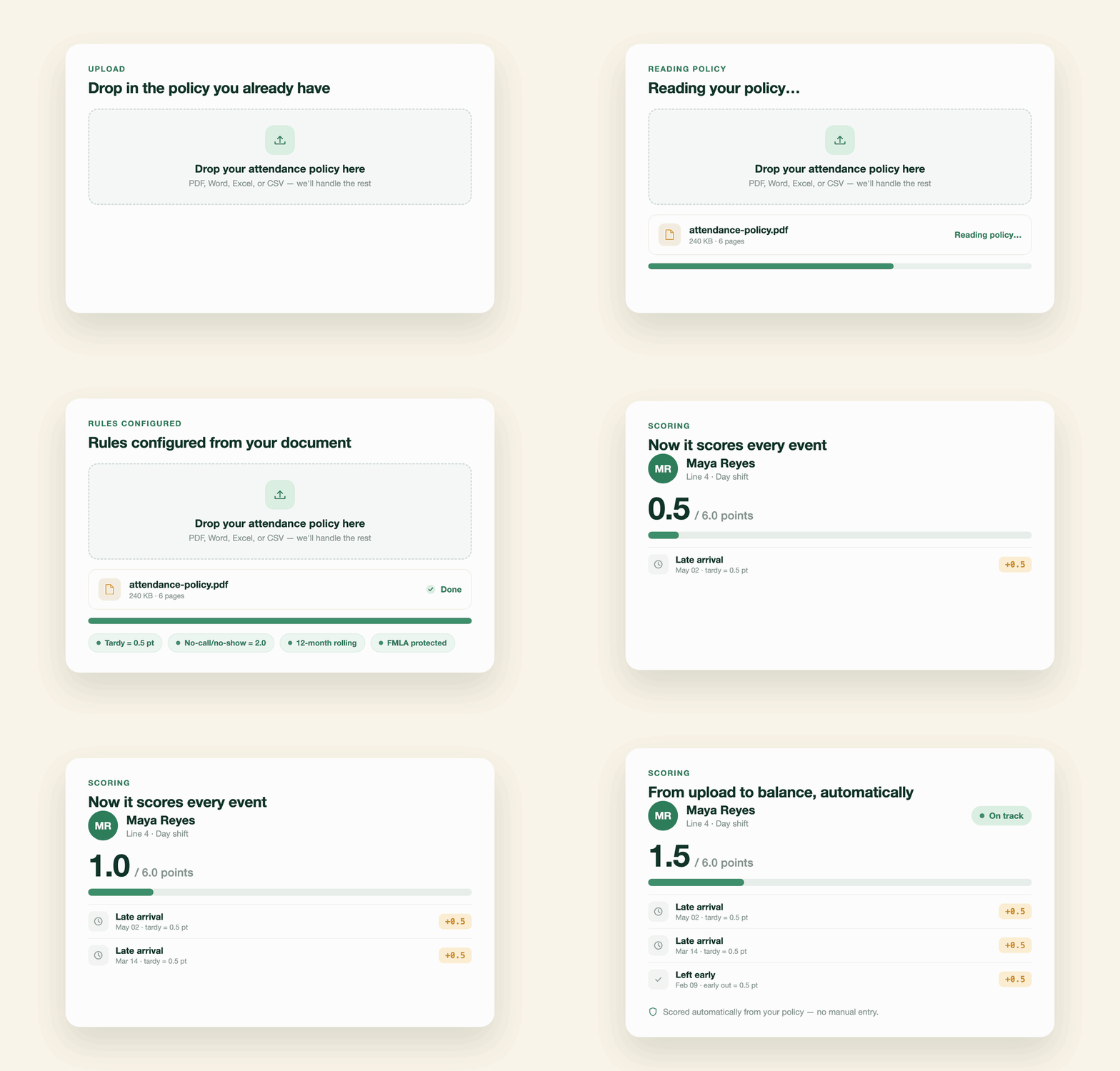


No two attendance policies are the same. Yours comes over intact.

The Points System scores against the live policy, grounded in what actually happened on the floor.

TeamSense flags possible FMLA situations a single event and a recurring pattern over time before any point is applied.

Confirmations, overrides, waivers, and policy edits are all on the record.

The same text-first experience your frontline already uses, now for attendance points.

The Points System tracks and pulls employee and absence data from Workday, ADP, UKG, Kronos, and SAP. Calculations, verification and cross-checks are layered on top. Nothing to rebuild, nothing for IT to maintain.


One text before the shift starts: who's in, who's out, and the gaps to cover. Plus a shift handoff that carries the outgoing supervisor's notes forward. No app, no integration.

Most digital forms stop when the employee hits send. Workflows sends the form by text, routes the response to the right person, and files it against the employee record automatically.

An employee help desk your frontline will actually use. They text a question and get an accurate answer in seconds, in their own language, from your sources.
TeamSense works without conditions. Every HRIS cell is hedged. Every spreadsheet cell requires a person to perform a manual task. No "if configured." No "if someone remembers." No "if self-service is on."
TeamSense scores every confirmed attendance event, absence, tardy, and early departure against your configured attendance policy the moment the event is captured. The engine applies the conditional rules real policies use, like holiday-week adjustments, late-versus-no-notice differences, and repeat-absence escalation, and records which rules produced each score. HR can review, override, or reverse any value, and every decision is logged in the audit trail.
Yes, that's the intended starting point. You can upload your existing policy document, and TeamSense extracts the rules, event types, point values, rolling windows, and discipline steps for you to review and adjust before activating. You can also configure a policy from scratch or start with a recommended baseline, and it can be uploaded and go live in under 30 minutes with no IT ticket.
Yes. Every policy change creates a new version with an effective date, and past events stay scored against the exact policy version that was in force on the day they occurred so a disputed point from March is always defensible against March's rules. Before activating a change, you can preview exactly what the revised policy would calculate against your live attendance data, with no impact on balances, notifications, or the audit record.
TeamSense inspects each attendance event for FMLA signals, the occurrence reason, employee notes, and supervisor notes before any point is applied. When a trusted source like your HRIS leave status or a supervisor confirmation verifies the leave, the point is waived to zero automatically and logged; when the signal is self-reported, the event is flagged and held for HR review first. HR makes the final call on every case, and other protected categories such as ADA or workers' comp are handled through HR override during review.
No. The engine handles routine scoring on its own and routes only the cases that need human judgment, like a self-reported protected-leave signal to HR for review. HR can override or reverse any value at any time with a reason on the record, and companies that prefer full control can switch to a mode where every event waits for HR confirmation before any point is applied.
Yes. Employees can check their current balance anytime by texting the same number they already use to report an absence, or from their profile in the app; no call to HR required. When an event pushes an employee across a discipline threshold, TeamSense also sends them a warning by text or email so they're never caught off guard. Supervisors see the same picture for their team, including each person's distance to the next threshold.
No. TeamSense calculates points, tracks threshold crossings, and flags patterns like consecutive no-call no-shows that may indicate job abandonment, but every flag is informational. Warnings, terminations, and escalation decisions stay with HR, and TeamSense never takes a disciplinary action or changes an employee's status on its own.
The Points System is available as an add-on to any TeamSense package, so it doesn't require a specific tier. Companies that calculate points in another system can still display employee point balances in TeamSense, including showing employees their balance before they call off — through a no-cost balance display integration.
See how TeamSense can help your team spot call-offs earlier, reduce reactive overtime costs, and plan coverage before the shift starts short.