
Fix the root cause of No-Call No-Show with help from TeamSense

Embracing new hires is just the start. Retaining Them Is The Battle.
The average rate of voluntary turnover in the Us in 2023 is 17.3%1
Effective retention starts with smart communication and attendance balance. TeamSense engages and retains your workforce through intuitive text-based solutions—where engagement means more than just showing up.
Creating a New Employee Orientation Template PPT Presentation?
Why Your Orientation Deck Needs More Than Just Slides
Onboarding is your first opportunity to cement your company culture. A generic presentation can feel like a chore, but a well-structured deck becomes a roadmap for success. When using our New Hire Orientation PPT Template, consider these four pillars to ensure your presentation sticks:
1. The "Why" Before the "What"
Don’t start with policy manuals or IT login steps. Start with your company’s story. Why does your business exist? What is the impact your employees have on the world, the industry, or your customers? Connecting the new hire to the mission creates "buy-in" before you even mention the benefits package.
2. The "Buddy" System & Connections
One of the most intimidating parts of a new job is the social aspect. Use your orientation deck to highlight:
The "Who’s Who": Include an organizational chart or photos of team leads.
The Onboarding Buddy: Introduce the concept of a peer mentor who will help them navigate the first 30 days.
3. Move from Passive to Active Learning
An orientation deck shouldn't be a 60-minute lecture. Use the slides in our template as conversation starters:
Interactive Check-ins: Stop after the "Policies" section to ask, "What questions do you have about how we handle shift flexibility?"
The "First Week" Checklist: Use the final slide to provide a clear, actionable list of goals for their first five days so they feel empowered, not overwhelmed.
What’s Included in Our Free Template?
We’ve structured this deck to cover the lifecycle of a new hire's first day. You can easily drag and drop your own branding into these sections:
| Section | Purpose |
|---|---|
| Welcome & Vision | Setting the tone and company mission. |
| The Employee Lifecycle | Growth opportunities and career pathing. |
| Policies & Safety | Compliance, HR standards, and workplace conduct. |
| Tech & Tools | How to access internal systems (like TeamSense). |
| The First 30 Days | Expectations, training plans, and feedback loops. |
3 Quick Tips for Customizing Your Presentation
Brand It: Replace the placeholder images with real photos of your office, your factory floor, or your team members. Authentic imagery builds trust.
Keep it Concise: If you have 50 slides, you will lose their attention. Aim for 15–20 slides and use the "Appendix" in the back for heavy policy details they can read later.
Use Accessible Language: Avoid jargon. If your company uses specific acronyms, add a "Cheat Sheet" slide at the end of your presentation.
Elevate Your Onboarding Beyond the Slides
While a great PowerPoint presentation is a fantastic start, the real magic happens in the day-to-day communication that follows. Once the orientation is over, how are you keeping new hires engaged?
TeamSense provides the tools to automate the "boring" parts of onboarding—like collecting emergency contacts, distributing daily policies, and answering common questions—so your managers can focus on building relationships with their new team members.
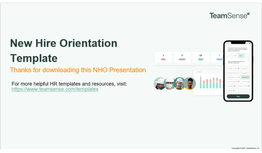
Download Your Orientation PPT Template For Free
Enter your company email below to get instant access to the template.

More Resources

The Math Problem That's Driving Turnover in Your Automotive Plant
Supervisor overload in automotive plants is an arithmetic problem, not a leadership problem. The math behind turnover, overtime, and missed output at automotive suppliers and what Toyo Tires, Martinrea, and Yanfeng did about it.

The Retention Cost of Rigid Attendance Policies in Automotive Manufacturing
Rigid attendance policies quietly push good employees out of automotive plants. See how Toyo Tires used TeamSense to cut turnover from 53% to 34%.

15 of the Best Absence Management Software Systems on the Market in 2026
Picking the right absence management system for your organization is a must! This list features the top absence management systems and software on the market today.
FAQs
-
It sets the tone for the rest of their time at your company, allowing them to understand expectations, company culture, and necessary information for their job. By taking the time to properly orientate a new employee, you're setting them up for success and potentially reducing turnover rates. You can add content to the new hire onboarding presentation make it an effective company introduction for new employees.
-
It sets the tone for the rest of their time at your company, allowing them to understand expectations, company culture, and necessary information for their job. By taking the time to properly orientate a new employee, you're setting them up for success and potentially reducing turnover rates. You can add content to the new hire onboarding presentation make it an effective company introduction for new employees.
-
This can vary, but it's generally a good idea to have a yearly review to ensure that new employees are well-orientated and current employees stay updated on any changes or updates. Additionally, new policies or procedures may be introduced throughout the year that should also be reviewed during these regular check-ins. You'll want to update the onboarding presentation template with new team leaders, new team members, relevant job training, organizational structure, and updates from other other departments or Human Resources.
-
Some companies may choose to have one-on-one meetings with individual employees, use an ESS system, hold group orientations, an office tour, or provide written materials such as an employee handbook. It's important to consider what will work best for your specific company, employees and onboarding process.
-
While the template may be able to serve as a base for creating a presentation about company updates or policies, it is primarily meant for onboarding new hires. It's important to regularly train and update all employees on necessary information, so consider creating a separate training PowerPoint or utilizing different methods for existing employees rather than using the same presentation. This new hire onboarding presentation is meant to be used in training sessions for newly hired employees.
-
Yes! We have a variety of articles and tips on our blog, including checklists and tips for successful onboarding. Your HR team can use these resources to craft an effective orientation program that aligns with your company mission, company policies, and company values. We hope this employee onboarding presentation template and other resources help all of your new hires get up to speed with their job duties, office equipment, the building's emergency exits, company tools, and company's work culture.
-
This new employee orientation PowerPoint template is free for download and use within your organization. No attribution is required. Resell, or distribution over the internet, or any other medium is strictly prohibited. TeamSense owns all rights, titles, and interests in and to the onboarding deck ppt.
By using this orientation ppt template, you agree to the terms and conditions set forth by TeamSense.com. This template is provided "as is" without warranty of any kind, either express or implied. If you'd like to use it for commercial purposes, please contact us for licensing options.
We hope you find this employee onboarding PowerPoint template helpful in streamlining the onboarding process for your company. If you have any questions or suggestions on how we can improve it, please don't hesitate to reach out to us at hello@teamsense.com! We would love to hear from you. Thanks for using our template!
-
Any way you can think of! Change the presentation design to fit portrait orientation rather than a landscape orientation, select custom slide size, update it to match other employee training materials, or upload it to Google Slides if needed. This employee onboarding presentation template is meant to be as flexible as you need it to be for your employee onboarding process, company policies and company culture.
Build a More Connected Organization Today
The Math Problem That's Driving Turnover in Your Automotive Plant
Supervisor overload in automotive plants is an arithmetic problem, not a leadership problem. The math behind turnover, overtime, and missed output at automotive suppliers and what Toyo Tires, Martinrea, and Yanfeng did about it.
The Retention Cost of Rigid Attendance Policies in Automotive Manufacturing
Rigid attendance policies quietly push good employees out of automotive plants. See how Toyo Tires used TeamSense to cut turnover from 53% to 34%.
15 of the Best Absence Management Software Systems on the Market in 2026
Picking the right absence management system for your organization is a must! This list features the top absence management systems and software on the market today.
