
Fix the root cause of No-Call No-Show with help from TeamSense

Embracing new hires is just the start. Retaining Them Is The Battle.
The average rate of voluntary turnover in the Us in 2023 is 17.3%1
Effective retention starts with smart communication and attendance balance. TeamSense engages and retains your workforce through intuitive text-based solutions—where engagement means more than just showing up.
New Hire Onboarding Checklist Template Download
Beyond the File: How to Use the Onboarding Checklist for Maximum Retention
An onboarding checklist is more than just a "to-do" list; it is a roadmap for employee engagement. According to industry data, employees who experience a structured onboarding process are 58% more likely to remain with the organization after three years. Our Excel template is designed to help you move from "paperwork" to "peoplework" by organizing tasks into four critical phases.
Phase 1: The "Pre-Boarding" Essentials (Before Day 1)
The period between the signed offer letter and the first day is where many companies lose momentum. Use the "Pre-Boarding" tab in our Excel sheet to track:
Hardware & Access: Ensure laptops, badges, and software logins (like TeamSense or your ERP) are ready before the employee arrives.
The Welcome Email: Send a schedule of the first week to reduce "first-day jitters."
Internal Announcements: Notify the team so the new hire arrives to a welcoming environment.
Phase 2: The First Week (Orientation & Integration)
The first week should focus on culture and safety rather than just technical tasks.
Compliance & Paperwork: Use the checklist to track I-9s, tax forms, and handbook acknowledgments.
Safety Walkthroughs: For manufacturing and logistics roles, ensure the safety tour is the top priority.
The "Buddy" Introduction: Assign a peer mentor to help the new hire navigate the unwritten rules of the workplace.
Phase 3: The First 30 Days (Role Competency)
By the end of month one, the employee should feel capable of performing their core functions.
Training Milestones: Use the Excel "Departmental" tab to check off specific system trainings.
Weekly 1-on-1s: Ensure the manager is meeting with the hire to provide immediate feedback.
Phase 4: The 60-90 Day Review (Full Integration)
Onboarding doesn't end after week one. Use the final section of our checklist to:
Gather Feedback: Ask the new hire how the process felt—this helps you improve the checklist for the next person!
Set Long-term Goals: Shift from "learning mode" to "contribution mode."
Why Use an Excel Checklist Over a Paper List?
While paper lists are easy to print, our New Hire Onboarding Excel Template offers several strategic advantages:
Multi-Departmental Collaboration: Send the file to IT, Security, and Payroll so everyone is working from the same source of truth.
Status Tracking: Use the "Percent Complete" or "Status" dropdowns to see exactly where a new hire is in their journey.
Scalability: Easily duplicate the tab for every new hire, creating a digital audit trail of your onboarding efforts.
Pro-Tip: Automate the "Friction" Out of Onboarding
While an Excel checklist is great for managers, how are you communicating with the employee?
TeamSense complements your onboarding checklist by automating the "check-ins." Instead of manual emails, use TeamSense to send automated text messages to new hires to see how their first week is going, distribute digital handbooks, and collect emergency contact info—all without requiring the employee to download an app.
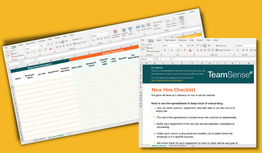
Download Your New Employee Onboarding Checklist Excel Template For Free
Enter your company email below to get instant access to the template.

More Resources

The Math Problem That's Driving Turnover in Your Automotive Plant
Supervisor overload in automotive plants is an arithmetic problem, not a leadership problem. The math behind turnover, overtime, and missed output at automotive suppliers and what Toyo Tires, Martinrea, and Yanfeng did about it.

The Retention Cost of Rigid Attendance Policies in Automotive Manufacturing
Rigid attendance policies quietly push good employees out of automotive plants. See how Toyo Tires used TeamSense to cut turnover from 53% to 34%.

15 of the Best Absence Management Software Systems on the Market in 2026
Picking the right absence management system for your organization is a must! This list features the top absence management systems and software on the market today.
FAQs
-
-
A new employee onboarding checklist is important because it helps ensure that all the necessary steps are taken in order to successfully onboard a new employee. Depending on how many departments are involved in welcoming a new employee, the onboarding process can be quite complex. A checklist born from the help of a new hire template helps to ensure that nothing is forgotten and that everyone knows what needs to be done.
Having a smooth and successful onboarding process is important for both the company and the employee. Having the best onboarding process makes it easy to assign tasks, create accounts, track the employee's progress, get employee feedback about onboarding materials, and ensure all new hire paperwork is completed. The Human Resources department will also have an easier time setting expectations related to job performance, company culture, company policies, dress code, informal performance review, and other onboarding processes with new hire checklists.
-
-
There are a few things that you can do to make the onboarding process easier:
Have a plan and timeline in place before the new hire starts
Delegate tasks to different team members or departments
Use an onboarding checklist for all new hires
Make sure to communicate often and keep the lines of communication open
Set up a mentorship program and assign an onboarding buddy
Have regular check-ins to see how the new hire is doing
Set up the employee's workstation and assign company resources
Distribute copies of employee handbooks, new employee forms, job descriptions, onboarding documents, and onboarding checklists
Ensure the new employee is clear on the start date, recruitment process, at will employment, onboarding tasks, meetings with other employees, and the company's culture
If you follow these tips for new employees, your onboarding process will be much smoother and easier for everyone involved. New hires will feel welcome and supported, which will help them to assimilate into the company culture and be more productive employees.
-
-
While our Excel template covers all the bases for each department, it is business-dependent. Feel free to edit, remove and add items to the checklist as you see fit for your company! Here are a few generic things that you may want to consider adding:
A welcome note or email from the company CEO or president
Company values and culture
An overview of the company's history
The employee's job description and responsibilities
A tour of the office or worksite
Introduction to key team members and managers
Here are some of the items that you may want to consider including in department-specific areas of the new hire checklist:
Human Resources:
Offer letter
Contract
Benefits Overview
Background Check
Tax Forms
Employee handbook
Security:
Building access card/fob
Computer access
Badge photo
IT:
Computer set-up
Email account set-up
Voicemail set-up
Network access
Printer access
Software licenses
Direct Manager:
First-day schedule
Project overviews
Team goals and expectations review
One-on-one meeting schedule
Mentorship program sign-up (if applicable)
By having a comprehensive and well-thought-out onboarding checklist, you can be sure that your new hire will have everything they need to hit the ground running on their first day. Making the onboarding process as smooth as possible will help to foster a positive working relationship from the start.
Some positions require a complex onboarding process. This will need more involvement from hiring managers to ensure the onboarding strategy is understood by the team member for their new job. In these cases, you may need more than a simple onboarding checklist template and instead build a full onboarding process template.
-
-
This Excel template is easily converted if you prefer to work in Google Sheets! Simply open a new Google sheet and head to file. In the drop-down menu, select open and look for the upload tab (at the time of this, it is at the end of the options). You can then drag and drop the file directly into the popup window or hit browse to look for the file on your desktop.
Once you have imported the new employee onboarding template file into Google Sheets, feel free to delete the original Excel template- you won't need it anymore! You can now edit, share and use the onboarding checklist entirely in Google Sheets.
-
-
This is a loaded question as it depends largely on the size of your organization, how often you hire, how many people are hired at once, and personal preference. If you're a small business and only onboard new hires a couple of times a year or infrequently, an excel template might be the best (and easiest) way to track everything.
If you're a mid to large-size organization or a enterprise-level organization, you likely have more complex onboarding needs. You may want to invest in an HRIS (human resources information system) or ATS (applicant tracking system). These software programs can automate a lot of the onboarding process and make things easier for both the HR department and the new hire. You can digitize new hire forms, reduce manual input into your HR system, streamline the hiring process, provide your HR onboarding checklist, and make the process easier for each new team member.
At the end of the day, it's up to you to decide what system will work best for your company to ensure a smooth onboarding process for each new employee and hiring manager. If you're not sure where to start, our employee onboarding checklist template excel template is a great starting point that can be easily customized to fit your specific needs.
-
-
This Excel onboarding new hire checklist template is free for download and use within your organization. No attribution is required. Resell, or distribution over the internet, or any other medium is strictly prohibited. TeamSense owns all rights, titles, and interests in and to the Excel new hire checklist template.
By using this Excel onboarding new hire checklist template, you agree to the terms and conditions set forth by TeamSense.com. This template is provided "as is" without warranty of any kind, either express or implied. If you'd like to use it for commercial purposes, please contact us for licensing options.
We hope you find this new hire onboarding checklist template helpful in streamlining the onboarding process for your company. If you have any questions or suggestions on how we can improve the new employee onboarding checklist for a more effective onboarding program, please don't hesitate to reach out to us at hello@teamsense.com! We would love to hear from you. Thanks for using our template!
Build a More Connected Organization Today
The Math Problem That's Driving Turnover in Your Automotive Plant
Supervisor overload in automotive plants is an arithmetic problem, not a leadership problem. The math behind turnover, overtime, and missed output at automotive suppliers and what Toyo Tires, Martinrea, and Yanfeng did about it.
The Retention Cost of Rigid Attendance Policies in Automotive Manufacturing
Rigid attendance policies quietly push good employees out of automotive plants. See how Toyo Tires used TeamSense to cut turnover from 53% to 34%.
15 of the Best Absence Management Software Systems on the Market in 2026
Picking the right absence management system for your organization is a must! This list features the top absence management systems and software on the market today.
