

Fix the root cause of No-Call No-Show with help from TeamSense
Table of Contents
- Introduction to Call-Off Hotlines
- How we evaluated these systems
- Pros and Cons of Traditional Employee Call-Off Hotlines
- Most Reliable Employee call out systems and attendance hotlines compared
- TeamSense: The Shift Intelligence Platform for Hourly Operations
- AMBS Call Center 24/7 Live-Agent Employee Call-Off Hotline
- AnswerFirst Pay-As-You-Go Live Answering Service
- Direct Line 24/7 Live-Agent Attendance Line
- Answer United Four Option Employee Absence Reporting Service
- Continental Message Solution Attendance Hotline and Absence Management Platform
- BambooHR Full HRIS for Office and Salaried Workforces
- HOURLY WORKFORCE QUICK-REFERENCE TABLE
- Key Features to Consider in a Call-Off Hotline
- How to Choose the Right Call-Off System for Your Business
- Is your call-off system actually working? 5 metrics to track
- Best Practices for Implementing an Employee Call-Off Hotline
This guide compares the seven most widely used employee call-off systems: text-based platforms, live-agent hotlines, and automated IVR lines. We’ll explain what each one actually does, where each falls short, and which environments each call-off service is built for breaking down the traditional and the innovative, including call-off hotline solutions that streamline absence management to help you find a solution that makes managing employee call-ins (and even reducing no-call no-shows) less stressful.
This guide is designed for HR professionals, operations managers, and business owners seeking to improve their absence management processes.
If you’re curious about the latest in absence management software, need to replace a voicemail-based call-out process, or want to move away from the inefficiencies of manual processes that often lead to errors and delays, modern solutions address these issues with automation and improved accuracy. Whether you’re evaluating a vendor or making a case internally for a better call-off system, this is the comparison to start with. Let’s get started on making those hectic mornings a bit more manageable!
What you’ll find here:
- A plain-language explanation of how employee call-off systems work
- The pros and cons of traditional hotlines vs. modern alternatives
- A side-by-side comparison of all six systems
- The criteria that matter for hourly, shift-based operations specifically
- Practical guidance on what to measure once you’ve made a switch
TeamSense is on this list, and we’ll be transparent about where it’s the right fit and where it isn’t.
Introduction to Call-Off Hotlines
An employee call-off hotline provides a centralized communication channel for employees to report absences, which helps in maintaining accurate records and arranging coverage quickly. An employee call-off hotline is a dedicated phone number that employees call to report they will be absent or tardy from work, capturing consistent information and immediately notifying supervisors, HR, and scheduling to handle payroll and documentation.
Employee call-off hotlines are a bit like lifelines for keeping things orderly when life throws a curveball at your team. Traditionally, reporting absences relied on manual phone calls, but modern systems now streamline this process. These systems handle everything from sudden sick days to unexpected personal issues, ensuring that each absence is tracked, properly documented, and logged quickly and efficiently. They manage call-outs for absences, sick leave, or tardiness. Let’s unpack the basics of call-off hotlines.
- Dedicated Phone Number: Companies are provided with a dedicated phone number that serves as a single contact point for employees to report call-outs such as absences, sick leave, or tardiness.
- Reporting to a Live Agent: Employees use this number to call and report their absence, usually speaking directly to a live agent.
- Information Relay: The live agent records the details of the absence and communicates this information back to the company.
- Pricing Structure: Most hotline services charge by the minute, including hold and talk time, and costs can vary widely per absence reported.
While the above is a simplified breakdown, keep in mind every company is different and may use an Interactive Voice Response (IVR) system instead of live operators, and how they report the absences back to the company will also vary.
How we evaluated these systems
We evaluated each system on five criteria that predict real-world outcomes for shift-based operations:
1. Employee adoption rate
Will hourly workers actually use it? A system with 60% adoption creates the same coverage blind spots as having no system at all. We prioritized solutions that work on any phone, require no download, and fit how frontline workers already communicate.
2. Speed from call-off to supervisor notification
Every minute between “employee decides not to come in” and “supervisor knows about it” is a minute of staffing response time lost. We looked at how each system routes notifications and whether that happens automatically or requires a human relay.
3. Policy enforcement consistency
Can the system enforce your attendance point policy the same way across every shift, every manager, and every location — or does enforcement still depend on individual managers doing it manually? Inconsistent enforcement is one of the most common sources of employee disputes and legal exposure.
4. Reporting and audit readiness
Does the system produce timestamped, structured records that hold up in a disciplinary review, a union grievance, or a compliance audit? Effective reporting should include comprehensive attendance data and robust record keeping to ensure compliance and facilitate audits, rather than generating logs that require manual cleanup before they’re usable.
5. Integration with your existing HR stack
Does absence data sync automatically to your HRIS, scheduling system, and payroll — or does someone have to re-enter it? Seamless integration should ensure that absence records are synchronized with HR systems to improve efficiency and compliance. Manual re-entry is where data degrades and where HR time gets wasted.
Employee call-off systems compared at a glance
| System | Best for | Intake method | Adoption barrier | Policy enforcement | Pricing model |
|---|---|---|---|---|---|
| TeamSense | Manufacturing, logistics, warehousing with hourly teams | Text (SMS) no app, no login | None works on any phone | Automated points tracking, real-time alerts | Flat per-employee/month |
| AMBS Call Center | Organizations that require a live human voice for every call-off | Live agent | Phone call required | Depends on agent accuracy | Per-minute (includes hold time) |
| Direct Line Tele Response | Multi-service businesses needing dispatch + call-off in one | Live agent | Phone call required | Manual relay to supervisors | Quote only |
| Answer United | Businesses with 50+ years comfort in traditional answering services | Live agent + automated option | Phone call required | Manual relay | Quote only |
| Answer First | Smaller operations needing a simple, low-cost live agent line | Live agent | Phone call required | Manual relay | Base rate + per minute |
| Continental Message Solution (CMS) | Large enterprise, especially healthcare, needing live + IVR hybrid | Live agent + IVR | Phone call required | Partial automation via IVR | Quote only |
Note on pricing: Most live-agent services charge per minute, including hold time. A single absence that takes 4 minutes to process costs $5–7 per call-off. At 150 call-offs/month, that's $750–1,050/month before overages and that figure goes up during peak absence periods.
Pros and Cons of Traditional Employee Call-Off Hotlines
Choosing the right call-off system is about more than ROI; it’s about keeping your team connected and operations smooth when unexpected absences occur. Traditional call-off hotlines are a familiar choice for many, but they come with both upsides and challenges. Let’s explore the pros and cons to see if they fit the rhythm of your workplace:
Pros:
- Structured Process: Ensures a formalized, consistent approach to absence reporting.
- Clear Records: Provides reliable documentation for compliance and absence management.
- Reduces HR Workload: Outsourced absence reporting frees up HR resources for other tasks.
- Standardized Compliance: Ensures that all call-offs are handled in a manner that complies with company policies and legal requirements, reducing the risk of disputes.
Cons:
- Cost Inefficiencies: Charges for talk and hold times can add up, making it expensive per reported absence.
- Time Delays: Employees may experience long wait times, especially during peak periods, leading to frustration.
- Dependence on Service Quality: The effectiveness of the hotline depends on the call center's operational efficiency, which can vary.
- Potential for Human Error: Relies on live agents, which introduces the possibility of errors in data entry.
- Language Barriers: There may be communication issues if the agent does not speak the employee's native language, leading to delays and additional costs as a suitable agent is found.
Understanding these factors will help you decide whether traditional hotlines are the right fit for your business or if a more modern solution, like call-off with text, might be more effective. For a full comparison of text vs. employee call-out hotline, click on the button below.

Most Reliable Employee call out systems and attendance hotlines compared
When an employee calls off at 5 a.m., how that information gets captured and how fast it reaches the right people determines whether your shift starts smoothly or scrambles. Modern employee call off hotline systems not only capture absences and manage employee call outs efficiently, but often include an employee absence tracker to track absences and support employee attendance tracking. The systems built to solve this problem range from traditional live-agent hotlines to modern text and app-based platforms. Each has different strengths depending on your workforce size, industry, and operational requirements. Below is an honest look at the options.
Please note that all features and pricing information were accurate at the time of publication, but may fluctuate.

TeamSense: The Shift Intelligence Platform for Hourly Operations
Best for: Manufacturing, logistics, warehousing, and any organization with a large hourly or frontline workforce that needs reliable, real-time absence reporting and direct communication without requiring employees to download an app or use a work email.
What makes TeamSense different from every other system on this list
TeamSense solves the whole chain from the moment an employee decides they can’t come in, through real-time supervisor notification, to automatic HRIS sync, attendance point visibility, and the ability to reach every worker across your operation in their preferred language.
The core difference is how employees interact with it. Instead of calling a hotline, navigating a phone tree, or downloading a company app, employees report absences via text message (SMS) by sending a keyword to a dedicated company number. This text-off hotline approach is often more convenient than traditional phone calls, as it eliminates the need to navigate voicemail systems or wait for someone to answer. A structured automated prompt collects the absence details. The supervisor gets an instant notification. The absence is timestamped, documented, and automatically synced to your HR systems. From employee text to supervisor alert: under 60 seconds.
The result, based on data from TeamSense customers: a 39% reduction in absenteeism at Kenco, a 50% drop in no-call/no-shows in 45 days at Martinrea, and a 30% reduction in overtime hours at Toyo Tires a 1,500-person tire plant running 24/7. Those outcomes come directly from closing the gap between "employee decides to call off" and "supervisor can act on it."
TeamSense was founded by former manufacturing leaders; the CEO, Sheila Stafford, previously led teams at GM and Whirlpool, and it was built specifically for the realities of the manufacturing floor, where hourly workers don’t have company email, may speak multiple languages, and make call-off decisions before dawn.
Key industries
- Manufacturing (automotive, industrial, consumer goods)
- Logistics and third-party logistics (3PL)
- Warehousing and distribution
- Retail (multi-location, shift-based environments)
- Healthcare (shift-based clinical and support teams)
- Hospitality and food service
How it works
- Employee sends a text message (SMS) with a keyword to your company’s dedicated TeamSense number
- Automated prompt collects absence details: reason code, shift, expected return
- Supervisor receives an instant notification with full details
- Absence is logged with a timestamp and synced to your HRIS automatically
- Attendance points update in real time employees can check their own balance by text at any time
No app download. No employee login. No hold time. Works on any phone, including basic devices.

Three plans
Plans are customized based on your workforce size, number of sites, and operational goals. The three outcome-based tiers are:
Visibility Shared attendance truth that builds trust and changes behavior.
- Text and IVR call-off reporting
- Timestamped audit trail of all absences
- Employees see their points and history before calling off
- Instant supervisor and admin alerts
- Online dashboard for real-time attendance management and reporting
Action (most popular) Activate your digital connection with analytics, communication, and workflow automation.
- Everything in Visibility, plus:
- Attendance analytics (trends, heat maps)
- Broadcast messaging to your full workforce or subgroups
- Employee portal company policies and documents accessible by text, no app
- Workflow automation (overtime requests, safety incident reporting, pulse surveys, shift preferences, PPE sizing, and more)
- Automatic message translation into employees’ preferred language, with AI-powered translation services supporting 135+ languages to ensure language barriers do not prevent accurate reporting
- Rapid shift backfills to quickly find coverage and reduce last-minute overtime surprises
Autonomy AI-powered automation for organizations ready to scale.
- Everything in Action, plus:
- AI Employee Assistant answers employee questions 24/7 via text, in any language, based on your company’s own policy documents
- Admin insights into what employees are asking, surfacing policy gaps proactively
Pricing is tailored to your workforce size and operational needs.
Book a demo for a quote →
Key features
- Text and IVR call-off via dedicated company number no app, no login
- Instant supervisor and admin alerts with full absence details
- Attendance point visibility employees check their own balance by text before calling off
- Broadcast messaging SMS to full workforce, subgroups, or individuals
- Automatic translation into employees’ preferred language, with AI-powered translation for 135+ languages
- Employee portal company resources, policies, and documents via text
- Workflow automation overtime requests, safety incidents, pulse surveys, and custom forms
- Rapid shift backfills to quickly find coverage and reduce overtime
- Online dashboard for real-time management and comprehensive attendance reporting
- AI Employee Assistant 24/7 text-based HR answers (Autonomy plan)
- HRIS integration SFTP and API-based integrations with ADP, Workday, and others
- SOC 2 certified enterprise-grade security
Pros
- No app download required works on any phone; zero adoption friction
- Full platform, not just a hotline the only system on this list that handles communication, engagement, and workflow automation alongside attendance
- Real-time attendance point visibility changes employee behavior before call-offs happen
- Multilingual by design automatic translation built into every messaging workflow, with AI-powered support for 135+ languages
- Fastest implementation on this list most customers are live in under 24 hours
- Flat predictable pricing no per-minute or per-call charges that spike during high-absence periods
- Customer results: 50% fewer no-call/no-shows in 45 days (Martinrea), 60% reduction in unplanned absences (Blue Bird), 5x increase in engagement survey participation (AAM)
- Online dashboard provides transparent, real-time attendance tracking and reporting
- Rapid shift backfills help reduce last-minute overtime and ensure coverage
Cons
- Not a full HRIS TeamSense is a frontline operating layer that connects to your HRIS; it does not replace payroll, benefits, or performance management
- No live human voice agent call-off goes through text or automated voice IVR, not a live operator (relevant if union agreements require a live person on the line)
- Pricing is custom and not published requires a demo conversation to get a quote
See What Yanfeng Procurement Manager, Devin Frosheiser, Has To Say About Employees Calling Off
AMBS Call Center 24/7 Live-Agent Employee Call-Off Hotline
Best for: Organizations that want a US-based local agent answering every employee call-off and managing call outs, with real-time reporting via a web portal.
What it is
AMBS Call Center is a family-owned answering service based in Michigan and Florida. They have a dedicated employee call-off hotline product (separate from their general answering service). Their model: employees call a dedicated number, a US-based local agent answers using your custom script, records the call out, logs a precise timestamp, issues a unique confirmation number to the employee, and dispatches the information to the shift supervisor and HR via the myAmbs HR+ portal.
Key industries
- Healthcare
- Property management
- Small and mid-size businesses
- Manufacturing
How it works
- Employee calls your dedicated AMBS hotline number (24/7/365)
- US-based local agent answers and records absence details (call outs) using your custom script, logs the timestamp, and issues a confirmation number
- Audio call is recorded for documentation
- Shift supervisor and HR receive real-time alert via email, text, app, or WFM software integration
- All data accessible via the myAmbs HR+ portal real-time call logs, custom reports, data export to Excel or WFM software
Setup typically takes fewer than 5 business days.
Key features
- 24/7/365 live agent coverage 100% US-based local agents
- AI Receptionist option automated intake at lower cost
- Real People + AI hybrid option live agents with AI support
- Bilingual support English and Spanish
- Customizable call scripts
- Audio recording of every call
- myAmbs HR+ portal real-time absence tracking, custom reports, trend analysis, point tracking
- Data export to Excel or WFM software
- Real-time notifications by email, text, app, or WFM integration
- Zapier integration and direct software integrations
- No holiday surcharges same rates 24/7/365
Pros
- Live human voice on every call preferred by workers who find automated systems impersonal
- Three service levels (live, AI, hybrid) offer flexibility
- Transparent published pricing no quote required for standard plans
- No holiday or after-hours surcharges
- myAmbs HR+ portal provides reporting and analytics beyond basic call logging
- Mass texting add-on available for workforce-wide communications
Cons
- Per-minute billing model high-absence periods get expensive; costs are not predictable the way flat-rate pricing is
- Bilingual support is English and Spanish only not adequate for linguistically diverse manufacturing workforces with many languages
- No attendance policy enforcement, points tracking, or automatic HRIS sync at the hotline level data requires manual downstream entry
- Hold times during peak call windows (early morning shift starts)
Pricing
AI Receptionist plans start at $75/mo for 100 minutes ($0.77/min excess). Real People + AI hybrid starts at $168/mo for 100 minutes. One-time setup fee of $85 applies.
AnswerFirst Pay-As-You-Go Live Answering Service
Best for: Businesses with variable or unpredictable call-off volume that want a live human on every call without being locked into minute bundles or contracts.
What it is
AnswerFirst is a Tampa, Florida-based answering service that has been operating since 1998. They provide call-off hotline solutions for managing employee absences, with a defining characteristic of a true pay-as-you-go pricing model: no preset minute bundles, one-second billing (so a 45-second call costs 45 seconds), and no contracts. Their employee callout and help line service provides a dedicated number with 24/7 live agent coverage using custom call scripts. All calls are accessible via their CWA (Client Web Access) online portal.
Key industries (from their site)
- Healthcare and medical
- IT and technology support
- Legal and law firms
- Real estate
- Service providers (HVAC, contractors)
- Small business
How it works
- Employee calls your dedicated AnswerFirst number
- US-based Customer Service Professional (CSP) answers
- Agent follows your custom script to collect absence details
- Message dispatched by text, email, page, or live transfer your choice
- All call recordings accessible via CWA portal for 90 days
Key features
- 24/7/365 live answering 100% US-based agents
- True pay-as-you-go billing one-second increments, no rounding
- No contracts cancel anytime without penalty
- No surcharges for nights, weekends, or holidays
- Custom call scripts per your requirements
- CWA web portal view messages, recordings, reports in real time
- Free integrations with most major business software
- One forwarding number included; additional numbers $3/month
- Account active within one to two business days
Pros
- Most flexible billing model in this group pays for exactly what you use
- No contract commitment
- Fast answer time 90% of calls on the first ring
- One-second billing is a genuine cost advantage over services that round to the minute
- Good fit for businesses with seasonal or unpredictable call-off volumes
Cons
- Costs increase unpredictably at high call volume, not ideal for large companies with 100+ call-offs per month
- No text-based call-off option phone only
- Relies on manual processes typical of traditional phone-based systems, which can limit efficiency and accuracy
- No attendance analytics, policy enforcement, or HRIS integration at the hotline level
- Bilingual capability not prominently featured
Pricing (confirmed from answerfirst.com/pricing)
- Monthly base rate: $30/month
- Per-minute rate: $1.55–$1.90/min (rate decreases automatically as monthly usage increases)
- Billing: True one-second increments never rounded up
- Contracts: None cancel anytime
- Nights, weekends, holidays: No surcharge
- Additional forwarding numbers: $3/month each
Exact per-minute tiers available via their pricing packet (submit form on pricing page)
Direct Line 24/7 Live-Agent Attendance Line
Best for: Employers needing a structured, 24/7 live-agent call-off line with confirmation numbers, call recording, automated record keeping, and custom reporting.
What it is
Direct Line has been providing answering and dispatch services since 1979. Their employee attendance line service is purpose-built for large employers: employees call a dedicated number, a US-based live agent answers using your custom script, manages call outs, issues a confirmation number, and dispatches the information to supervisors and HR. The neutral reporting process allows employees to report absences without navigating corporate chains. They offer bilingual support, IVR as an option, and HIPAA-compliant messaging for healthcare environments. They also offer Translation Integration Services for multilingual workforces.
Key industries
- Property management
- Medical and eldercare
- Law offices
- IT support
- Manufacturing
- Government agencies
- Real estate, HVAC, contractors, and others
How it works
- Employee calls the dedicated attendance line for call-outs
- US-based live agent answers, collects absence details using your custom script
- Employee receives a confirmation number
- Detailed message dispatched instantly to supervisors and HR by text or email
- Call is recorded and time-stamped for accurate record keeping; custom reports delivered daily, weekly, or monthly
Key features
- 24/7/365 live agent coverage US-based
- Confirmation numbers issued on every call
- Call recording and time-stamping
- Automated record keeping and custom reporting daily, weekly, monthly delivery
- Bilingual support available
- IVR option available for automated intake
- Translation Integration Services for diverse workforces
- HIPAA-compliant messaging for healthcare environments
- CRM integration
- Emergency dispatch capability
Pros
- 45+ years of call center experience (founded 1979)
- Confirmation numbers provide an auditable paper trail for every call-off and call-out
- Automated record keeping and custom reporting platform deliver structured absence data on schedule
- Multiple service types under one vendor (live agent, IVR, bilingual, translation)
Cons
- Pricing requires a quote for full scope entry-level plans, which are published, but most employer deployments require a custom discussion
- No text-based call-off option, employees must call
- No attendance analytics, policy enforcement, or HRIS integration at the hotline level
- Bilingual/translation capability exists but requires integration services, not fully automated
Direct Line’s website states: “answering service plans start at just $115/month.” Full scope pricing for employee attendance line deployments requires a direct quote.
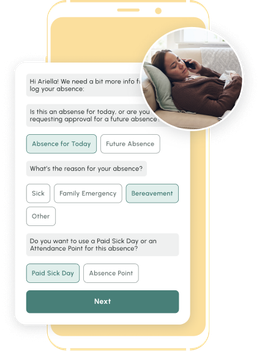
No one wants to talk to their boss or a 1-800 stranger to call off. Text changes everything - Reducing No Call No Shows.
Answer United Four Option Employee Absence Reporting Service
Best for: Organizations that want flexibility across multiple intake methods including text/web-based reporting and are particularly strong in healthcare or need complex dispatching and backfill options.
What it is
Answer United is a Kalamazoo, Michigan-based answering service with over six decades of experience roots going back to the early 1960s and a dedicated employee absence management product. What makes them distinctive in this comparison is their four-option service model, which organizations can choose: live agent, automated IVR, AI-powered, or web/text-based reporting.
Key industries
- Healthcare and medical (primary emphasis)
- Government agencies
- Legal
- Property management
- Factories and manufacturing
- HVAC, elevator, dental, and others
How it works four options
- Live Agent: Employee calls → live agent collects absence data via custom script → confirmation code issued → manager notified by email/text → data in AU Insight portal
- Automated IVR: Employee calls → automated prompts guide structured intake → system auto-dispatches notification → data in AU Insight
- AI-Powered: Employee calls → AI handles conversational intake → instant dispatch → documented in AU Insight
- Web/Text Reporting: Employee submits absence via text or web form → system processes and routes → manager notified → logged in AU Insight
Key features
- Four intake options: live agent, automated IVR, AI, and web/text
- 24/7/365 coverage across all options
- Customized call scripts and IVR flows
- Confirmation codes issued to employees for every call-off
- AU Insight portal real-time online dashboard and employee absence tracker, call history, reports, time-stamped records
- Helps identify attendance patterns for improved workforce management, scheduling, and payroll accuracy
- English and Spanish language support across all options
- Complex dispatching options and backfill routing (live agent option)
- CRM data feed (optional on both live and automated)
- On-call web scheduler managers define on-call availability and contact order
- Bilingual service
- HIPAA-compliant
- BBB A+ accredited
Pros
- Only vendor on this list offering all four intake methods from one provider
- Strong compliance documentation for healthcare and regulated environments
- AU Insight portal provides a transparent, real-time online dashboard and employee absence tracker for reporting without needing to export manually
- Complex dispatching logic (backfill routing) available on live agent tier
- Decades of operational experience
Cons
- Web/text option exists but is not the primary offering Answer United’s core product is still phone-based
- English and Spanish only limited for highly diverse workforces with many languages
- No attendance policy enforcement or automatic HRIS sync described on the product page
Pricing
Not publicly listed. Submit the “Get Pricing” form on their website or call for a custom quote based on your employee count, preferred intake method, and call volume.
Continental Message Solution Attendance Hotline and Absence Management Platform
Best for: Large organizations with complex compliance requirements, multi-site operations, and the need for automated policy enforcement.
What it is
CMS was founded in 1967 in Columbus, Ohio. The system captures information on employee absences, including those for an entire day, and provides attendance data for managerial purposes, helping organizations plan ahead and track absent or tardy employees and tardy employees across every team member.
Key industries
- Healthcare and senior living
- Retail and hospitality
- Government
- Manufacturing
- Logistics and distribution
How it works
- Employee reports absence via phone (live agent or IVR), text, or mobile app
- System captures absence details
- Supervisors and HR receive notification
- Absence data syncs
Key features
- Live agent and IVR intake 24/7/365
- Multi-channel reporting phone, text, app
- 150+ languages supported
- Attendance policy tracking and point calculations
- Progressive discipline documentation
- HRIS integration
- Management and employee self-service portals
Pros
- Multi-channel intake gives employees flexibility in how they report
- 150+ language support covers linguistically diverse workforces
- HRIS integration reduces manual data entry
- Long operational history with enterprise manufacturing clients
Cons
- All intake methods still require employees to initiate a phone call or open an app
- Longer implementation timeline than lighter-weight solutions
- All the automation requires upfront policy configuration plan for an onboarding investment
Pricing
Not publicly listed. Contact CMS via their pricing page (continentalmessage.com/pricing) for a quote based on employee count, location count, and feature requirements. CMS is enterprise-priced and most appropriate for organizations managing hundreds to thousands of hourly employees.
Visit Continental Message Solution →
BambooHR Full HRIS for Office and Salaried Workforces
Best for: Small-to-mid-size businesses with primarily salaried or office-based employees that need a comprehensive HR platform hiring, onboarding, records, PTO tracking, performance management, and payroll in a single system.
What it is
BambooHR is one of the most widely used HR software platforms for SMBs and mid-market companies, serving customers in dozens of countries. It handles the full employee lifecycle through a clean, highly-rated interface that employees and HR teams consistently describe as easy to use. BambooHR is included in this comparison because many HR teams evaluating call-off systems are simultaneously evaluating broader HR software, and BambooHR is frequently in that conversation.
Critical distinction: BambooHR manages planned, structured time-off requests. It does not function as a call-off hotline. When an employee can't make their shift at 5:30 a.m., BambooHR has no mechanism to capture that notification, alert a supervisor, or trigger a coverage response. If unplanned absence management is your primary need especially in a shift-based manufacturing or logistics environment BambooHR alone does not solve that problem.
Key industries
- Technology and software companies
- Professional services
- Construction
- Education
- Finance
- Healthcare (office administration)
- Nonprofits
- Small and mid-sized companies across sectors
How it works (for time-off management)
- Employee logs into BambooHR portal (web or mobile app) and submits a time-off request
- Manager receives a notification and approves or denies
- Approved time off populates the team "Who's Out" calendar and syncs with payroll
- HR tracks balances, accruals, and leave history in a centralized dashboard
This workflow assumes advance notice and employee portal access. There is no equivalent path for unplanned same-day absences that need to reach a supervisor before a shift begins.
Key features
- Employee records centralized database for all HR data
- Time-off management PTO, sick leave, parental leave, bereavement; included in all plans
- "Who's Out" calendar team visibility into scheduled time off
- PTO calculator employees self-serve their own balance
- Onboarding automation digital paperwork, tasks, resource access
- Applicant tracking system (ATS) job postings, candidate tracking, hiring collaboration
- Performance management reviews, goal tracking, feedback (available as a feature)
- Payroll US payroll with automatic tax calculations and direct deposit
- Time Tracking clock in/out, geolocation, project tracking (add-on at additional cost)
- Benefits administration enrollment, HSA/FSA, broker data export
- 150+ integrations including scheduling tools like Deputy, MakeShift, and others
- Mobile app iOS and Android; most desktop features available on mobile
- Employee community and notification center internal announcements and updates
- Free 7-day trial available
Pros
- Best-in-class user experience consistently rated easiest to use among HRIS platforms
- PTO and time-off management included in all plans no add-on required
- Comprehensive HR lifecycle coverage from hire to termination
- Strong employee self-service for standard requests
- 150+ integrations with scheduling, payroll, and productivity tools
- Free trial available (7 days)
Cons
- Not designed for unplanned absence management no real-time call-off capture, no supervisor alert, no coverage response trigger
- Requires employee login not accessible for workers without company email or regular computer access
- Time Tracking (clock in/out, geolocation) is a paid add-on, not included in base plans
- Shift scheduling is not native requires integration with third-party tools like Deputy or MakeShift
- No multilingual SMS communication for frontline workers
- Pricing not publicly listed requires a quote
Pricing
BambooHR does not publish pricing on their website.
Pricing is per-employee, per-month and scales with headcount. Time Tracking and some other features are paid add-ons beyond the base plan.
No one wants to talk to their boss or a 1-800 stranger to call off. Text changes everything - Reducing No Call No Shows.
HOURLY WORKFORCE QUICK-REFERENCE TABLE
| Need | TeamSense | AMBS | AnswerFirst | Direct Line | Answer United | CMS | BambooHR |
|---|---|---|---|---|---|---|---|
| No app or login for employees | ✅ | ✅ | ✅ | ✅ | ✅ | ✅ | ❌ |
| Text-based call-off intake | ✅ | ❌ | ❌ | ❌ | ✅ (web/text option) | ✅ (text/app) | ❌ |
| Live human agent option | ❌ | ✅ | ✅ | ✅ | ✅ | ✅ | ❌ |
| Real-time supervisor notification | ✅ | ✅ | ✅ | ✅ | ✅ | ✅ | ❌ |
| 30+ languages | ✅ | ❌ (EN/ES only) | ❌ | Limited | ❌ (EN/ES only) | ✅ (150+) | ❌ |
| Automatic HRIS sync | ✅ | ❌ | ❌ | ❌ | ❌ | ✅ | ✅ |
| Attendance policy enforcement | ✅ | ❌ | ❌ | ❌ | ❌ | ✅ | Limited |
| Broadcast messaging to workforce | ✅ | Add-on ($29/mo) | ❌ | ❌ | ✅ (mass comm) | ✅ | ❌ |
| Predictable flat-rate pricing | ✅ | ❌ | ❌ | Partial | ❌ | ❌ | ❌ |
| Implementation under 24 hours | ✅ | ✅ (~5 days) | ✅ | ✅ | ✅ | ❌ | ❌ |
| Built for hourly shift workers | ✅ | Partial | ❌ | Partial | Partial | ✅ | ❌ |
Key Features to Consider in a Call-Off Hotline
When researching call-off hotlines, answering services, or employee attendance management systems, it's crucial to focus on features that enhance functionality and user experience. Here’s a closer look at the essential attributes.
System Availability
A reliable call-off hotline needs to be available around the clock, every day of the year. This ensures that no matter when an employee needs to report an absence whether during late-night shifts or on holidays the system is ready to record their call. High availability prevents any gaps in reporting and ensures seamless operations across all work schedules.
Ease of Use
The interface of the call-off hotline should be straightforward and intuitive, allowing employees to report their absences quickly and without hassle. A complicated system can lead to frustration, increased errors in reporting, or even discourage use. Ideally, the call out line system should require minimal training so that all employees, regardless of their tech-savviness, can use it confidently.
Integration with HR Software
For maximum efficiency, the hotline system should integrate seamlessly with your existing HR software platforms. This integration enables automatic updates to employee attendance records, reducing the need for manual data entry and minimizing the risk of errors. It also helps in generating timely reports that HR teams can use for further analysis and decision-making.
Compliance and Security Features
It's critical that the call-off hotline complies with legal standards such as GDPR in Europe or HIPAA in the United States, especially when handling sensitive employee data. The system should include robust security measures to protect this data and human resources from unauthorized access or breaches. Additionally, compliance features ensure that the business adheres to regional labor laws and regulations concerning employee rights and absence reporting.
Cost Efficiency of Call-Off Hotlines
Evaluating the cost efficiency of call-off hotlines is crucial for any organization looking to optimize HR expenses. These systems typically charge based on usage, including per-minute fees for calls, which can vary widely depending on the provider and the specific features offered. A cost-effective hotline not only fits within your budget but also offers value in reducing HR workload through automation and integration. Additionally, considering the long-term savings from improved absence management and reduced manual, daily administrative tasks is vital in assessing the overall cost benefits.
How to Choose the Right Call-Off System for Your Business
We get it choosing the right call-off system is a big deal for your business. You want something that fits your needs, is easy for everyone to use, and helps keep things running smoothly. Here’s how to make sure you’re picking the best option for your team.
Assessing Organizational Needs
Start by thinking about what your business really needs. Do you need a system that just collects basic info, or something more detailed? Consider how many call-offs you get on a busy day. If it’s a lot, you’ll want a system with strong automated features to handle all the data load without missing a beat.
Think about your team. If you have a diverse workforce, it’s important that the system supports multiple languages. You want everyone to feel comfortable using it. Also, check that the system can integrate smoothly with your current HR software, so updates are automatic and save you time.
Finally, make sure the system complies with labor laws and regulations, especially for protected absences. This helps avoid any employee disputes or legal headaches down the road.
Considering System Scalability and Flexibility
As your business grows, your call-off system should grow with you. Look for a solution that can handle an increasing number of employees and call volumes. Customization is key being able to tweak call scripts, reports, and notifications to fit your specific needs makes a big difference.
The system should be user-friendly, making it easy for everyone to report absences without a hassle. This reduces errors and makes the process smoother for both the absent employees and managers.
Cost is always a factor, so find a system that offers good value for your money. Compare different options to ensure you’re getting the best features without breaking the bank. Lastly, reliable customer support is crucial. You want to know that if something goes wrong, help is just a call or click away.
We encourage you to dive deeper into each option we’ve discussed. Each system has its strengths, and the right choice depends on your unique needs and circumstances. Take your time, do more research, and consider reaching out to the providers for demos or trials. This will give you a better sense of which system will work best for your team and help you make an informed decision you’ll be happy with in the long run.
Is your call-off system actually working? 5 metrics to track
Switching systems is only worth it if the new one produces better outcomes. Here’s what to measure in the first 90 days after implementation and what each metric tells you.
1. Time-to-notify (target: under 5 minutes)
How long does it take from the moment an employee submits a call-off to the moment the right supervisor is notified? In a text-based system, this should be under 60 seconds. In a live-agent hotline, it’s typically 3–10 minutes after the employee finishes the call. Anything over 15 minutes means your coverage response is already behind.
2. Adoption rate (target: 90%+)
What percentage of unplanned absences are being reported through the system vs. informal channels (texts to managers, word of mouth)? Low adoption means the system isn’t doing its job and your data is incomplete. TeamSense customers average 100% adoption because there’s no app to download and no learning curve.
3. Policy enforcement consistency (target: 0 exceptions)
Are attendance points being applied the same way across every manager, shift, and location? If enforcement still depends on individual manager discretion, your system is creating legal exposure and fairness complaints. A well-configured call-off system applies policy automatically so no one has to remember the rules.
4. Overtime triggered by coverage gaps (track weekly)
How often does a late-noticed absence force you into emergency overtime? This is the most direct cost the right system can reduce. Benchmark your weekly overtime instances before switching and measure the same number 90 days in. TeamSense customers have documented overtime reductions of 20–40% within the first quarter.
5. HR time spent on absence administration (target: 80% reduction)
How many hours per week does your HR team spend logging absences, chasing down details, updating attendance records, and fielding disputes? A system that automates intake, logging, and HRIS sync should reduce this to near zero for routine call-offs. If your HR team is still manually entering absence data after implementation, the integration isn’t configured correctly.
6. Reporting and analytics: tracking attendance patterns and absences
Evaluate how well the system enables you to track absences and analyze attendance patterns. Effective reporting tools should provide real-time dashboards and centralized reporting, allowing you to identify trends and respond quickly to last-minute call-offs. Aggregated data from these reports helps HR pinpoint chronic absenteeism patterns, improving workforce management and supporting accurate scheduling and payroll.
Best Practices for Implementing an Employee Call-Off Hotline
Setting up an employee call-off hotline isn’t just about picking a system and calling it a day. To make sure it actually helps streamline attendance tracking (instead of becoming just another HR headache), here are a few best practices to follow:
1. Make the Call-Off Process Stupid-Easy
The whole point of having a hotline is to simplify absence reporting, so don’t overcomplicate it. Employees should know exactly when, where, and how to call off without having to dig through a 20-page handbook. A dedicated number, clear instructions, and minimal steps keep frustration to a minimum. Bonus points if your system allows multiple ways to report an absence like text, call, or an online portal.
2. Ensure 24/7 Availability
Life happens outside of business hours. If your employees are working late shifts, weekends, or holidays, your call-off system should be there for them at all hours not just when HR is at their desks. Whether it's live agents, an automated IVR, or a text-based system, availability is key.
3. Provide Multilingual Support
If your workforce is diverse, your call-off hotline should be too. A system that offers multiple language options ensures every employee can report an absence without getting lost in translation. This can help reduce misunderstandings and compliance risks (because “I thought I called off” isn’t a battle you want to fight).
4. Automate What You Can
Nobody likes playing a game of telephone with absence reports. If your hotline isn’t automatically logging absences and syncing with your HR software, you’re inviting human error, delays, and unnecessary admin work. The best systems integrate directly with attendance tracking tools so that as soon as an absence is reported, it’s logged, and managers get real-time updates.
5. Keep It Confidential
Employees don’t want to explain why they’re calling off to a stranger over the phone especially if it’s something personal. Having a hotline that prioritizes privacy (instead of interrogating people for details they don’t need to share) builds trust and ensures employees actually use the system instead of ghosting.
6. Set Up Real-Time Notifications for Supervisors
The faster managers know about absences, the faster they can adjust staffing. Whether it's text alerts, emails, or dashboard notifications, immediate updates help keep shifts covered and prevent those “why didn’t anyone tell me?” moments.
7. Regularly Review & Improve the Process
Hotlines aren’t a “set it and forget it” thing. Track call-off data, review reports, and check in with employees to see if the system is working smoothly. If there are constant delays, unclear instructions, or employees avoiding the system altogether, it’s time for some adjustments.
By following these best practices, your employee call-off hotline can actually do its job helping HR manage absences efficiently while making it easier for employees to report when they need time off.
About the Author

Jackie Jones, Content Strategist, TeamSense | Workforce Attendance & Frontline Operations
Jackie Jones is a content strategist at TeamSense, where she has spent the past four years working closely with CEO Sheila Stafford and the TeamSense team to cover the workforce issues that affect manufacturing operations every day. Her work focuses on attendance, absenteeism, shift coverage, frontline communication, supervisor workload, and the operational impact staffing instability has on productivity, overtime, safety, and downtime.
Through direct collaboration with manufacturing leaders and customer-facing teams, Jackie has built deep familiarity with how workforce challenges show up inside real plants and how companies respond when visibility is limited. She writes about frontline operations with a focus on practical problems, clear language, and the day-to-day realities supervisors, HR teams, and plant leaders are trying to solve.
